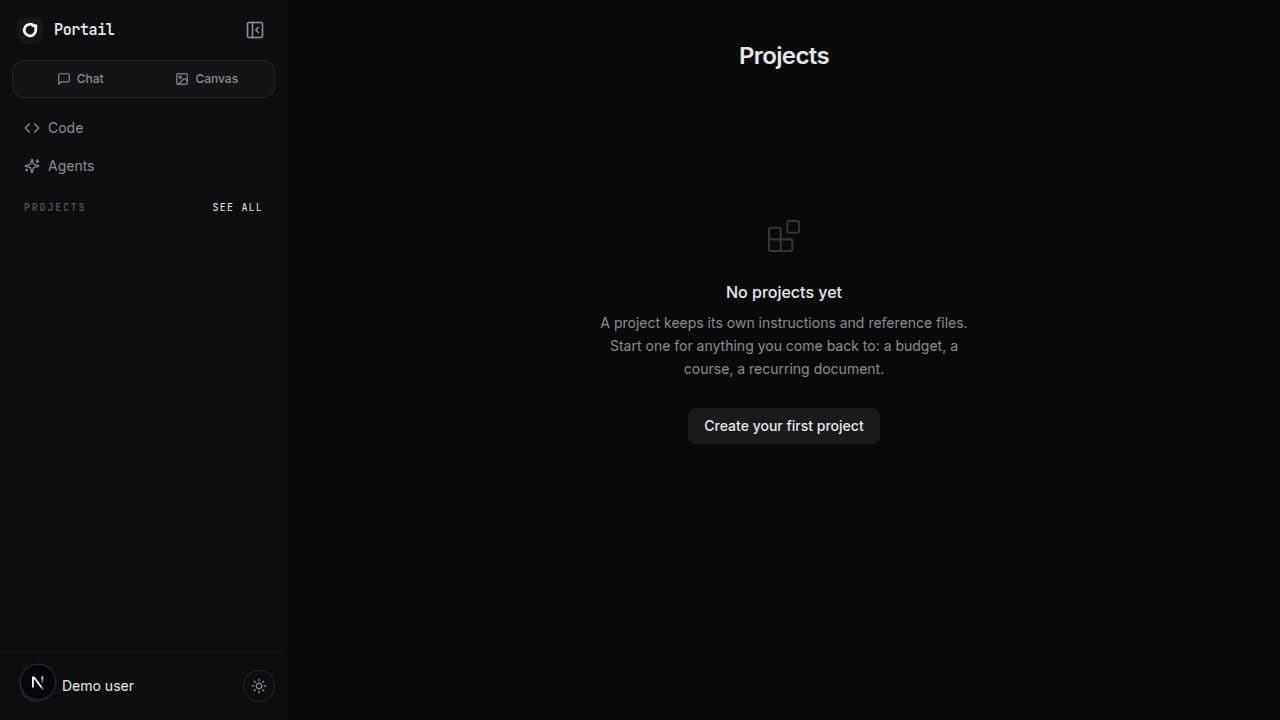
Projects moves into the same sidebar as chat
The Projects page now uses Portail's app sidebar instead of a separate header. Projects, regular chats, Code, Agents, Canvas, theme controls, and account identity stay within reach while you organise your work, and the duplicate Portail logo and Back to chat button are gone from the page header.
313 words
Added the familiar Portail sidebar to the full Projects page on desktop.
Added a mobile sidebar drawer with a clear menu control and backdrop.
Removed the standalone page header, including its duplicate Portail logo and Back to chat button.
Kept recent projects and regular chats directly accessible from the Projects page.
Matched the chat sidebar's collapse preference, navigation links, account identity, and theme control.
The full Projects page used to feel like a separate part of Portail. Opening it replaced the chat sidebar with a thin header containing another Portail logo and a Back to chat link. The project grid still worked, but the surrounding navigation disappeared at exactly the moment you were deciding where to work next. Returning to a conversation took an extra step, and the page looked disconnected from the app that had sent you there.
Projects now opens inside the same sidebar structure used by chat. The left side keeps Chat and Canvas at the top, links to Code and Agents underneath, and a Projects section with your recent project names. Regular conversations remain listed below, so you can move from organising a project to opening an unrelated chat without first bouncing through another page. Your account identity and theme switch stay at the bottom where they already live in chat. The old standalone header is gone, including its duplicate logo and Back to chat control, leaving one clear navigation system on the screen.
The sidebar also follows the existing collapse preference. If you collapse it in chat, Projects respects that choice and leaves a compact control for bringing it back. If you collapse it on the Projects page, chat remembers the same setting. On smaller screens the sidebar becomes a drawer opened from a menu button, with a backdrop that closes it cleanly. The project title, search, sorting, creation button, cards, loading state, and empty state keep their previous layout and behavior inside the remaining space.
This is a small structural fix, but it removes a recurring bit of friction. Projects is not a destination outside chat. It is where recurring work gets its instructions and reference files, and it should feel like part of the same workspace. The page now keeps that context visible without adding another navigation pattern to learn.
Screenshots