Appearance and language settings, plus a calendar connector that can list events
Settings > Customization now has its own Appearance and Language sections instead of leaving those controls scattered around the app. Dark and Light are now a visible, labeled choice instead of a single footer icon, and English and Russian can be switched right from inside the chat app, not just before signing in. The Google Calendar connector also grew a new tool: it can list upcoming events, so the assistant can check what is on your calendar without first needing to create or remove anything.
489 words
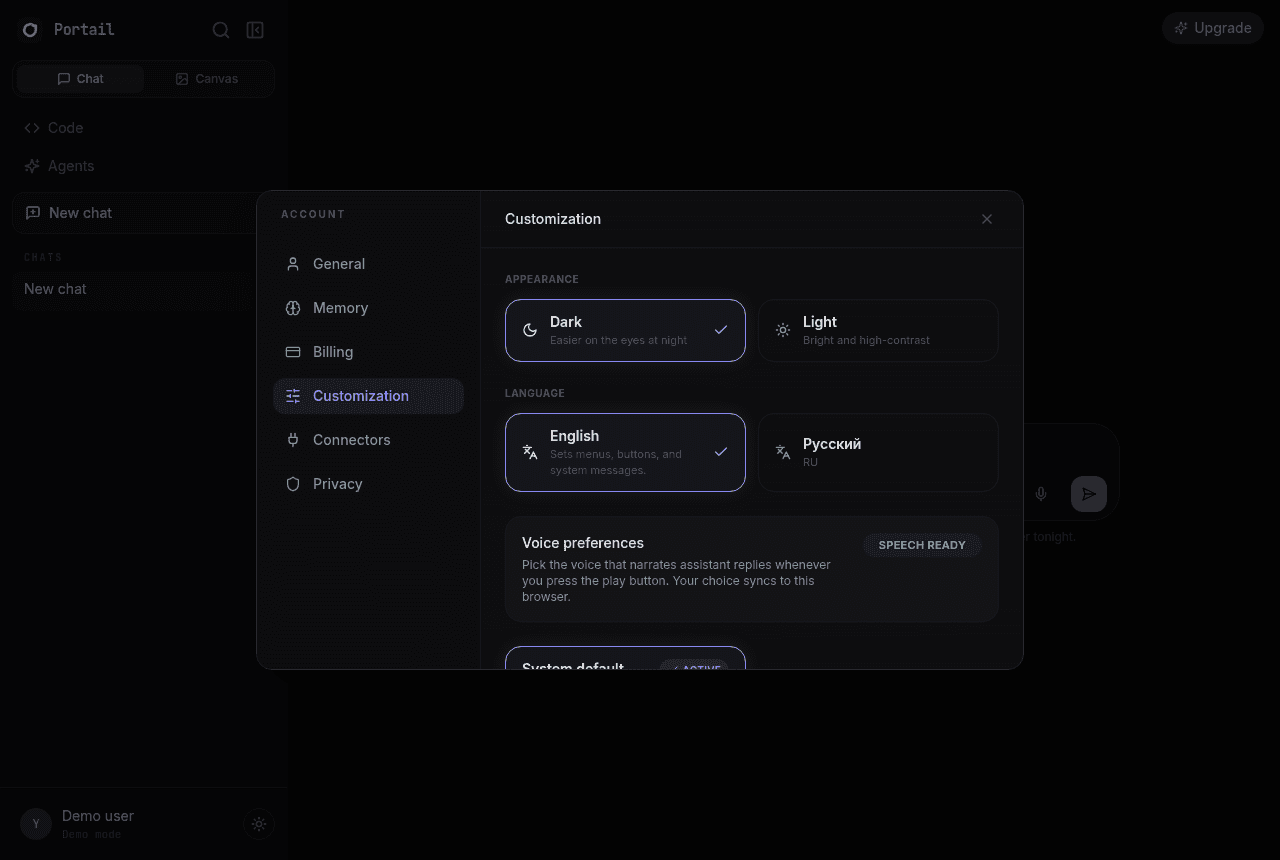
Added an Appearance section to Settings > Customization with explicit Dark and Light cards.
Added a Language section to Settings > Customization with English and Russian cards, the first way to switch language from inside the signed-in chat app.
The Google Calendar connector can now list upcoming events (view, not just create or remove), so the assistant can check your calendar before touching it.
Portail v2.1.1 shipped on 2026-09-22 as a patch release focused on appearance and language settings, plus a calendar connector that can list events. Settings > Customization now has its own Appearance and Language sections instead of leaving those controls scattered around the app. Dark and Light are now a visible, labeled choice instead of a single footer icon, and English and Russian can be switched right from inside the chat app, not just before signing in. The Google Calendar connector also grew a new tool: it can list upcoming events, so the assistant can check what is on your calendar without first needing to create or remove anything. The work is recorded here because small releases are still product history. They change how people sign in, read responses, pay for access, share conversations, open files, or trust the system when something goes wrong.
The main changes were direct: added an appearance section to settings > customization with explicit dark and light cards, added a language section to settings > customization with english and russian cards, the first way to switch language from inside the signed-in chat app, and the google calendar connector can now list upcoming events (view, not just create or remove), so the assistant can check your calendar before touching it. That list is intentionally plain. It names what changed without turning the release into theatre. When a release fixes a build, a redirect, a storage path, or a UI edge case, the value is often that users stop noticing the problem. The archive keeps that invisible work visible enough for future debugging and for anyone checking whether Portail has cared about the details over time.
This version also fits into the wider Portail contract. One account, one chat history, and one model picker only work if the smaller pieces keep their promises. Authentication has to fail clearly. Billing has to count honestly. Uploads have to arrive in a form models can read. Admin tools have to show the operator what happened instead of hiding it behind a blank screen. v2.1.1 moved that contract forward in its own narrow lane.
The screenshots attached to this entry show the public release record as it now appears on portail.cc. For older releases, this archive was rebuilt from the git history, package version changes, release modal text, and commit subjects. That means the page is honest about its source: it documents the shipped change and preserves the record going forward, even when the exact old production screen cannot be recreated from a single saved image.
The practical result is simple. Someone landing on this page can see the version number, date, release tier, headline, highlights, and a real rendered screenshot of the archive page. Search engines can index the post through the canonical URL, sitemap entry, and structured data. Future releases now have a standard to meet before deploy, so the history should get cleaner from here instead of fuzzier.
Screenshots