Your chats stay with you, and any chat can start a meeting
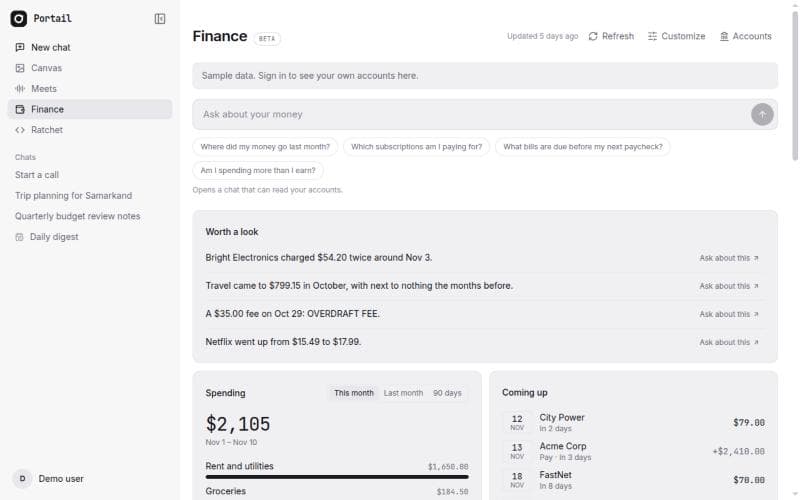
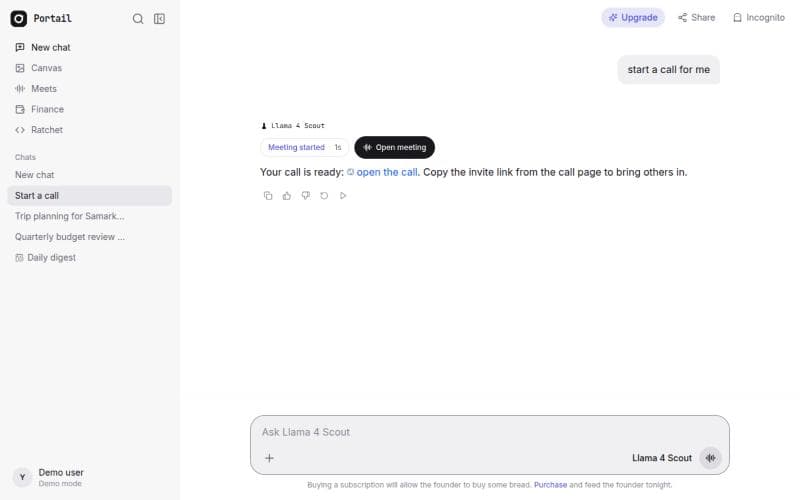
Portail has grown a few rooms of its own: Finance, Meets and Canvas. Until today, walking into one of them felt like leaving the house. The sidebar changed, your chat list vanished, and getting back to a conversation meant going back to the chat first. That's gone. Finance, Meets, a meeting page, a call and Canvas now share the same sidebar as the chat, with the same New chat button, the same projects and every one of your chats, newest first. Click a chat from anywhere and it opens right where you left it. On a phone, the menu button opens the same list. The other half of this release is about not having to visit those rooms at all. You could already ask any chat about your money or about a past meeting. Now you can also ask it to start one. Say "start a call for me" and Portail sets up a Portail video call, hands you the link to open it, and shows an Open meeting button right under the reply. The invite link for everyone else is one click away on the call page, so it never sits in a chat you might share later. If you're meeting in person, or you're already on Zoom, Google Meet or Teams, say so and Portail starts a room meeting instead, where it listens through your microphone once you open the page and press Start listening. It's the same meeting you'd get from Meets: the same recording notice the first time, the same credits, and the same limit of two meetings at once. If anything stands in the way, Portail tells you what it is instead of guessing. A chat that has read what people said in a past meeting won't start a new one on its own, for the same reason it won't send email after reading a transcript: someone on that call could have asked for it, and only you get to. Meetings themselves got more room too. A live meeting has a Full screen button that hides the sidebar and fills the display, so the call is the only thing on screen. Press Esc or the button again to get the sidebar back, and it comes back by itself when the meeting ends. Inside a Portail call you can drag the edge of the side panel to make the chat, transcript and notes wider or narrower, and show any person large with the button in the corner of their tile. Everyone else moves to a row underneath, and you can drag the line between them to decide how much space the big view gets. A shared screen takes the big view on its own. In a room meeting, drag the line between the notes and the Ask Portail chat to give either one more space. Every size you pick is remembered on that device, and the drag handles work from the keyboard too: focus one and use the arrow keys, or press Enter to put it back.
1191 words
Finance, Meets, a meeting, a call and Canvas now keep the same sidebar as the chat, with your projects and every chat in it.
Ask any chat to "start a call" and Portail starts a Portail video call, gives you the link, and shows an Open meeting button.
Say you're in person or already on Zoom, Meet or Teams, and it starts a room meeting that listens through your microphone instead.
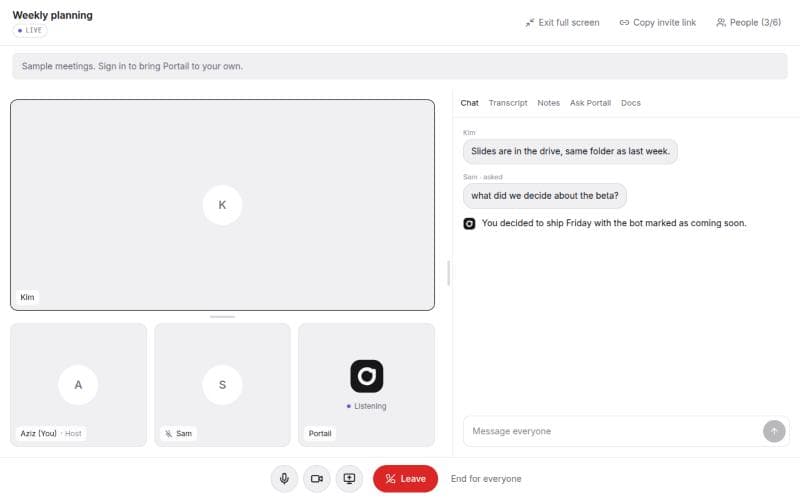
A Full screen button in every live meeting hides the sidebar and fills the display. Esc brings it back.
In a call, drag the side panel wider or narrower, show any person large, and drag the line to size the big view against everyone else.
In a room meeting, drag the line between the notes and the Ask Portail chat. Sizes are remembered, and the handles work with the arrow keys.
Portail v2.14.0 shipped on 2026-11-15 as a minor release focused on your chats stay with you, and any chat can start a meeting. Portail has grown a few rooms of its own: Finance, Meets and Canvas. Until today, walking into one of them felt like leaving the house. The sidebar changed, your chat list vanished, and getting back to a conversation meant going back to the chat first. That's gone. Finance, Meets, a meeting page, a call and Canvas now share the same sidebar as the chat, with the same New chat button, the same projects and every one of your chats, newest first. Click a chat from anywhere and it opens right where you left it. On a phone, the menu button opens the same list. The other half of this release is about not having to visit those rooms at all. You could already ask any chat about your money or about a past meeting. Now you can also ask it to start one. Say "start a call for me" and Portail sets up a Portail video call, hands you the link to open it, and shows an Open meeting button right under the reply. The invite link for everyone else is one click away on the call page, so it never sits in a chat you might share later. If you're meeting in person, or you're already on Zoom, Google Meet or Teams, say so and Portail starts a room meeting instead, where it listens through your microphone once you open the page and press Start listening. It's the same meeting you'd get from Meets: the same recording notice the first time, the same credits, and the same limit of two meetings at once. If anything stands in the way, Portail tells you what it is instead of guessing. A chat that has read what people said in a past meeting won't start a new one on its own, for the same reason it won't send email after reading a transcript: someone on that call could have asked for it, and only you get to. Meetings themselves got more room too. A live meeting has a Full screen button that hides the sidebar and fills the display, so the call is the only thing on screen. Press Esc or the button again to get the sidebar back, and it comes back by itself when the meeting ends. Inside a Portail call you can drag the edge of the side panel to make the chat, transcript and notes wider or narrower, and show any person large with the button in the corner of their tile. Everyone else moves to a row underneath, and you can drag the line between them to decide how much space the big view gets. A shared screen takes the big view on its own. In a room meeting, drag the line between the notes and the Ask Portail chat to give either one more space. Every size you pick is remembered on that device, and the drag handles work from the keyboard too: focus one and use the arrow keys, or press Enter to put it back. The work is recorded here because small releases are still product history. They change how people sign in, read responses, pay for access, share conversations, open files, or trust the system when something goes wrong.
This was more than a quiet maintenance pass. A minor release changes how a visible part of Portail behaves, how a larger workflow is framed, or how a user understands the product. The important part is not only that the feature exists. The important part is that it joins the rest of the system without making the chat harder to use. Portail is useful because context travels with the user. Every larger release has to protect that feeling.
The main changes were direct: finance, meets, a meeting, a call and canvas now keep the same sidebar as the chat, with your projects and every chat in it, ask any chat to "start a call" and portail starts a portail video call, gives you the link, and shows an open meeting button, say you're in person or already on zoom, meet or teams, and it starts a room meeting that listens through your microphone instead, a full screen button in every live meeting hides the sidebar and fills the display. esc brings it back, in a call, drag the side panel wider or narrower, show any person large, and drag the line to size the big view against everyone else, and in a room meeting, drag the line between the notes and the ask portail chat. sizes are remembered, and the handles work with the arrow keys. That list is intentionally plain. It names what changed without turning the release into theatre. When a release fixes a build, a redirect, a storage path, or a UI edge case, the value is often that users stop noticing the problem. The archive keeps that invisible work visible enough for future debugging and for anyone checking whether Portail has cared about the details over time.
For this release, the archive points back to the verified commit trail instead of relying on memory. The title, date, and highlights come from the repository history around v2.14.0. That matters because a release log should be boringly checkable. If someone wants to know why a feature appeared, why a page changed, or why a billing rule behaves differently, the public record and the engineering record should not disagree.
This version also fits into the wider Portail contract. One account, one chat history, and one model picker only work if the smaller pieces keep their promises. Authentication has to fail clearly. Billing has to count honestly. Uploads have to arrive in a form models can read. Admin tools have to show the operator what happened instead of hiding it behind a blank screen. v2.14.0 moved that contract forward in its own narrow lane.
The product lesson is also worth naming. Portail grew quickly through chat, admin, billing, Canvas, Omniverse, Agents, and the coding hand-off bridge. Features landed close together, and some releases bundled polish with deeper infrastructure. This post separates the user-facing promise from the implementation noise. It says what the release changed, why that mattered, and where it sits in the product timeline.
The screenshots attached to this entry show the public release record as it now appears on portail.cc. For older releases, this archive was rebuilt from the git history, package version changes, release modal text, and commit subjects. That means the page is honest about its source: it documents the shipped change and preserves the record going forward, even when the exact old production screen cannot be recreated from a single saved image.
The practical result is simple. Someone landing on this page can see the version number, date, release tier, headline, highlights, and a real rendered screenshot of the archive page. Search engines can index the post through the canonical URL, sitemap entry, and structured data. Future releases now have a standard to meet before deploy, so the history should get cleaner from here instead of fuzzier.
Screenshots