Portail Tunes: say what you want to hear, and it plays
Portail has a music player now, and you don't have to know what to put on. Open Tunes in the sidebar and type what you're in the mood for, the way you'd say it to a friend who has good taste. "Something calm to focus to." "Upbeat songs for a run." "Rainy evening jazz." Portail works out what that means, finds the music, fills a queue and starts playing. There are no playlists to build and nothing to pick through. If you want a particular song, name it: "play Bohemian Rhapsody" puts on Bohemian Rhapsody. Name an artist and you get their best-known songs. Mix the two ("chill songs like Frank Ocean") and you get a few of theirs with some similar music after them. The music comes from two places, and the page always tells you which one you're hearing. Moods, genres and activities play full-length tracks by independent artists from Audius, a free streaming service where musicians share their work to be played. That covers a lot of what people put on while they work, study, cook or run: lo-fi, house, ambient, jazz, hip-hop, chill, focus music and plenty more. Songs and artists you name come from Deezer's mainstream catalogue, and those play as 30-second previews. Every preview carries a "Full song on Deezer" link, so when a preview hooks you, the whole song is one click away. We'd rather be clear about that than pretend: Portail can't play every famous song in full, so it tells you which tracks are previews instead of leaving you guessing. Portail also never makes a song up. The model only decides what to look for, and everything that plays comes straight from the catalogues. If a song you asked for isn't there, Tunes says it couldn't find it rather than slipping in a cover or something that sounds close. Follow-ups work the way you'd hope. "More like this" adds fresh tracks to the end of your queue and skips what you've already heard this session. "Something faster" or "less sad" builds on what's playing right now. If you just want to look something up by name, switch the box to Search: it checks both catalogues at once with no model involved, so it costs nothing. Asking Portail uses a very small amount of credits per request, and playing music uses none. The player does what a player should. There's a queue where you can play any track, remove one or clear the lot, and a bar along the bottom with play, pause, next, previous, a seek bar and volume. Your volume is remembered on that device. Media keys, headphone buttons and your phone's lock screen control it too, and the space bar plays and pauses when you're not typing. While music is playing, links in the sidebar open in a new tab, so checking a chat doesn't stop the song. You don't have to open Tunes at all, either. In the web app, ask any chat to "play some Daft Punk" or "put on something calm to study to", and the reply comes with a small player right under it: play, skip, the song list, and the same previews and full tracks as the Tunes page. The chat reply doesn't cost anything extra for the music, and the music keeps going when you switch to another chat, with a little player bar above the box you type in. "Open in Tunes" moves the whole queue to the Tunes page and carries on from the same second. Tunes works on every plan, in English and Russian, in light and dark, on a phone or a computer. It's in beta, so tell us what you asked for and what it played, especially when it gets it wrong.
1361 words
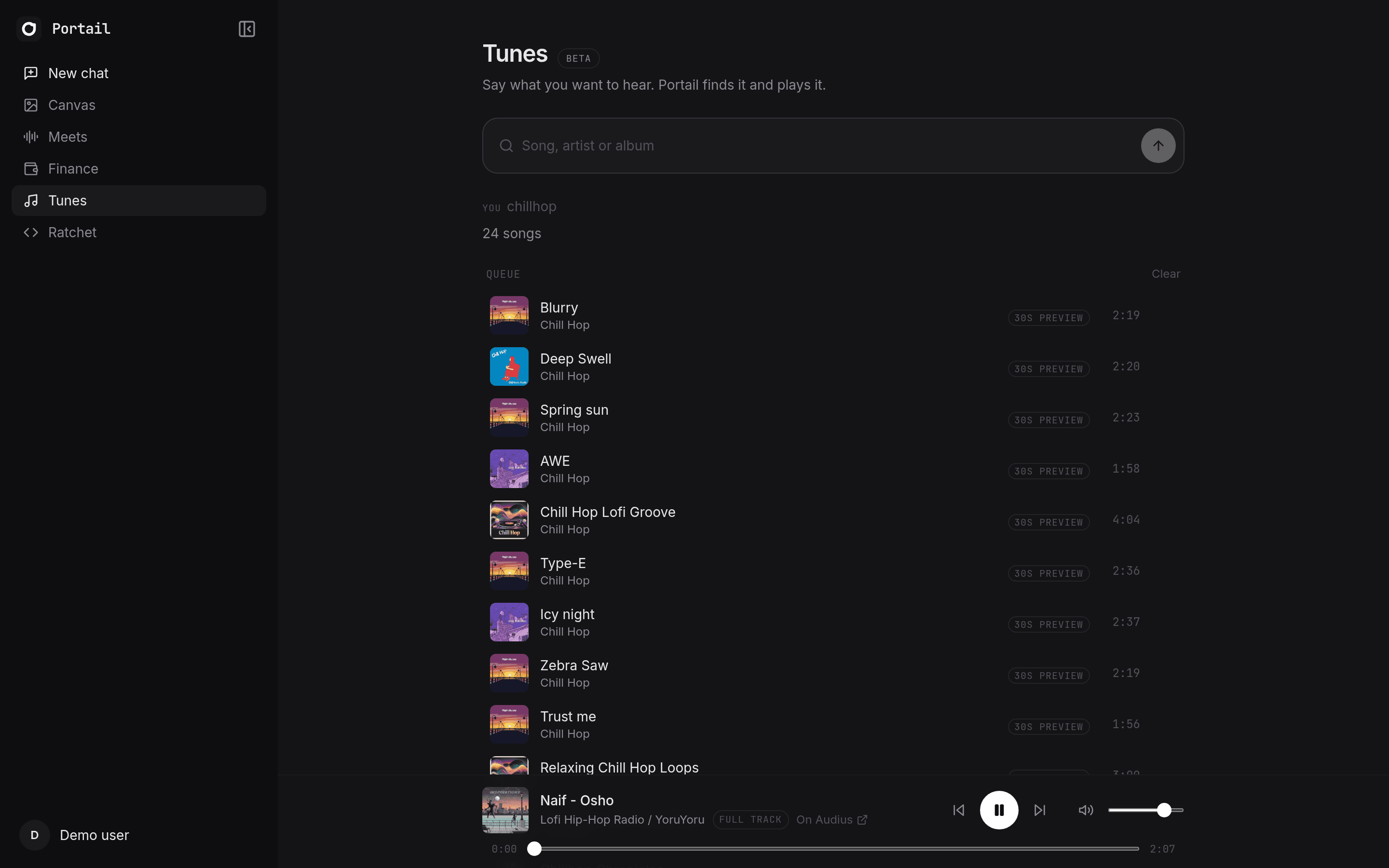
New Tunes page in the sidebar: type a mood, an activity, a genre, an artist or a song, and Portail fills a queue and starts playing.
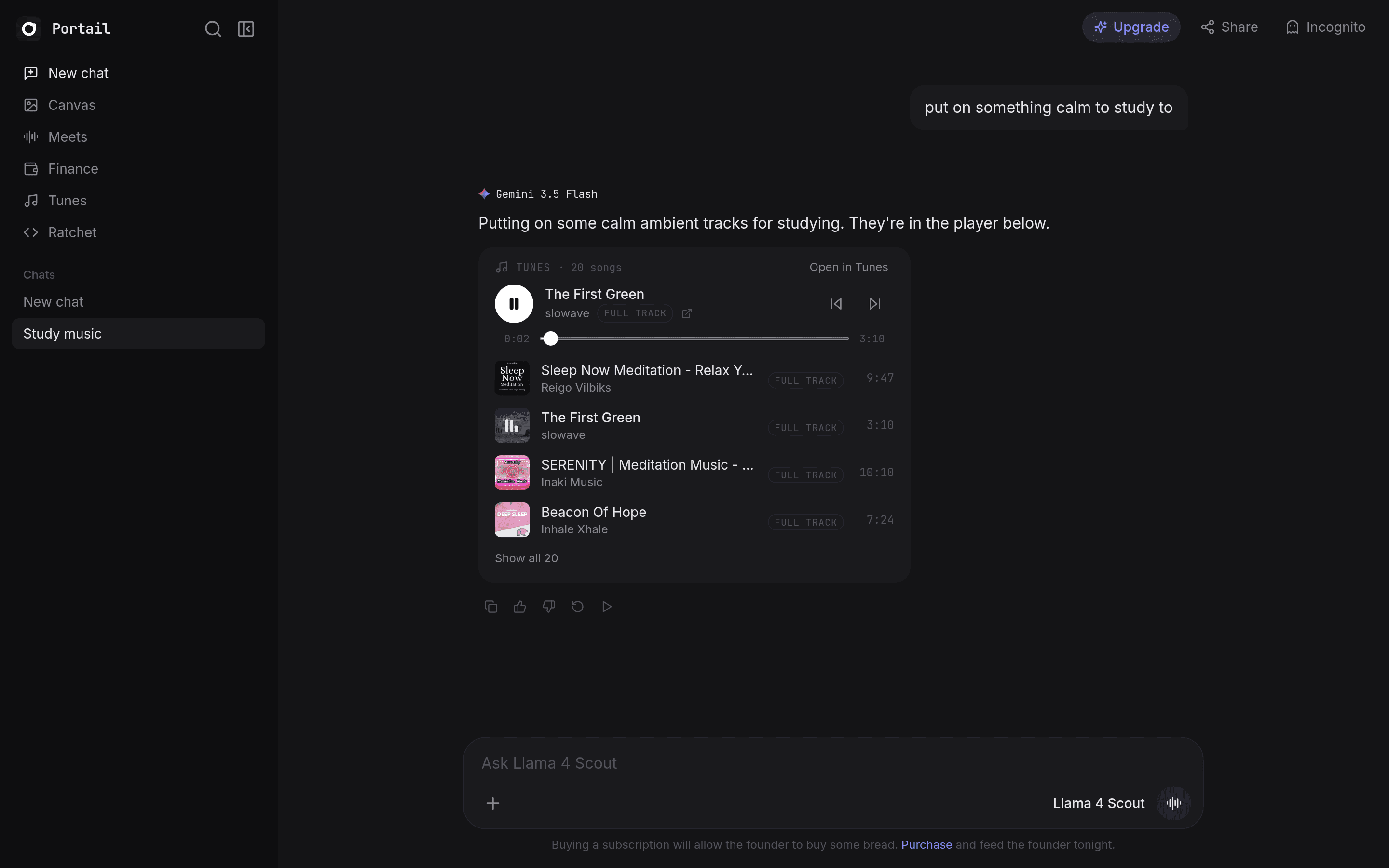
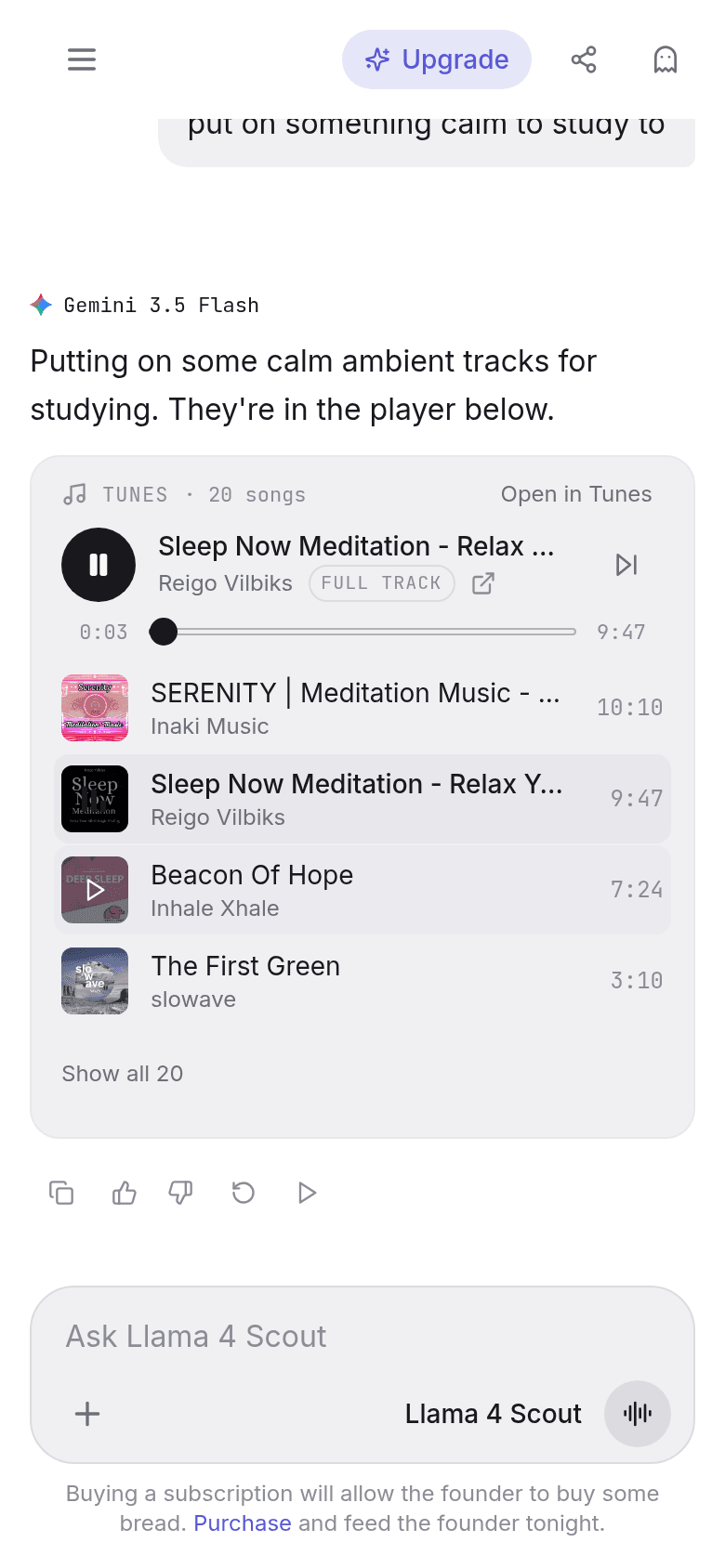
In the web app, ask any chat to play something ("play some Daft Punk", "put on something calm to study to") and a player appears right under the reply. It keeps playing when you switch chats, and "Open in Tunes" carries the queue over.
Moods and genres play full-length tracks from independent artists on Audius.
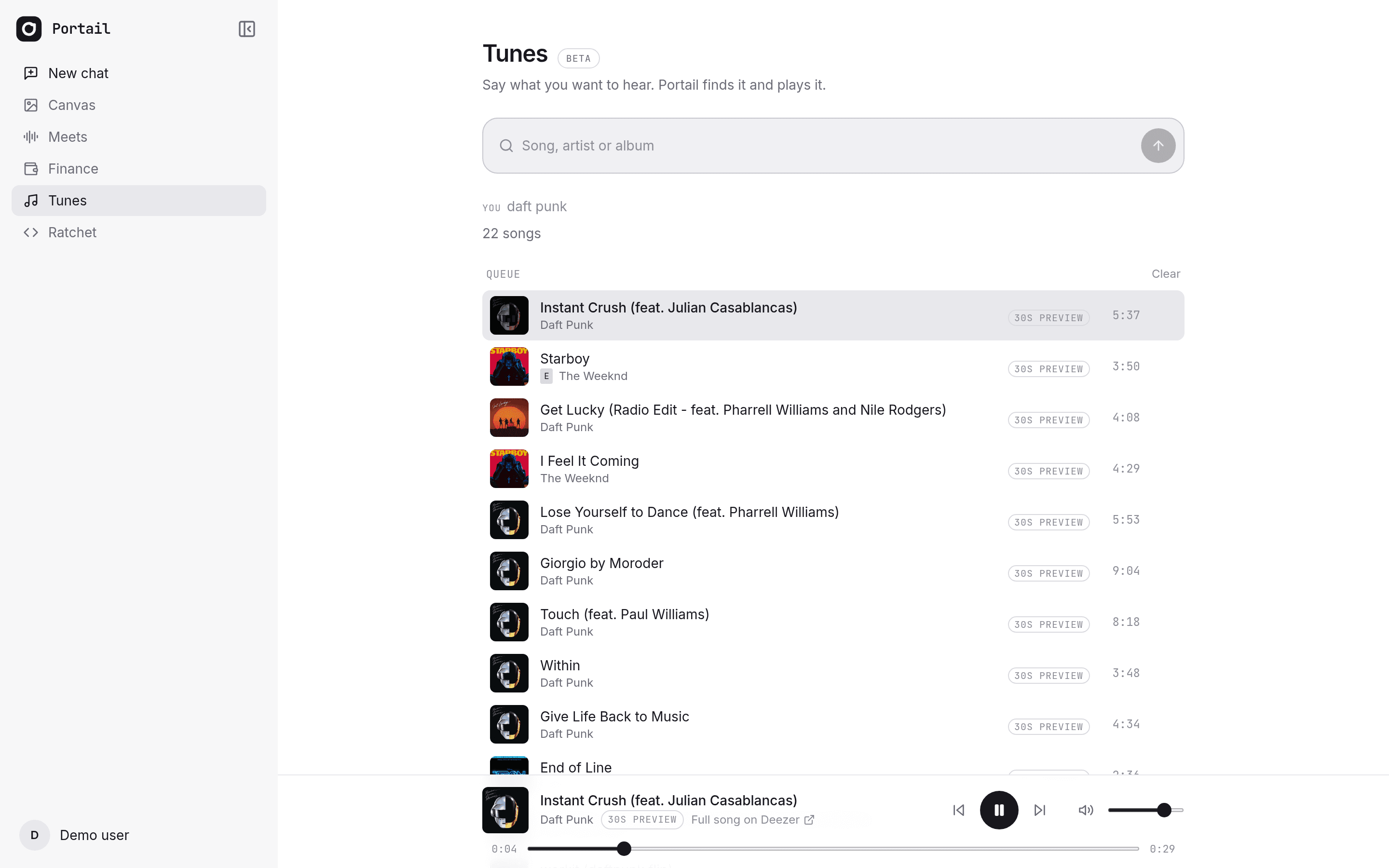
Songs and artists you name play as 30-second previews from Deezer, each with a link to the full song.
Portail never invents a song. If something you asked for isn't in the catalogue, it tells you instead of playing a stand-in.
"More like this" adds fresh tracks without repeating what you've heard, and follow-ups like "something faster" build on what's playing.
Search mode looks songs up by name with no model and no credits. Asking Portail uses a few credits; listening uses none.
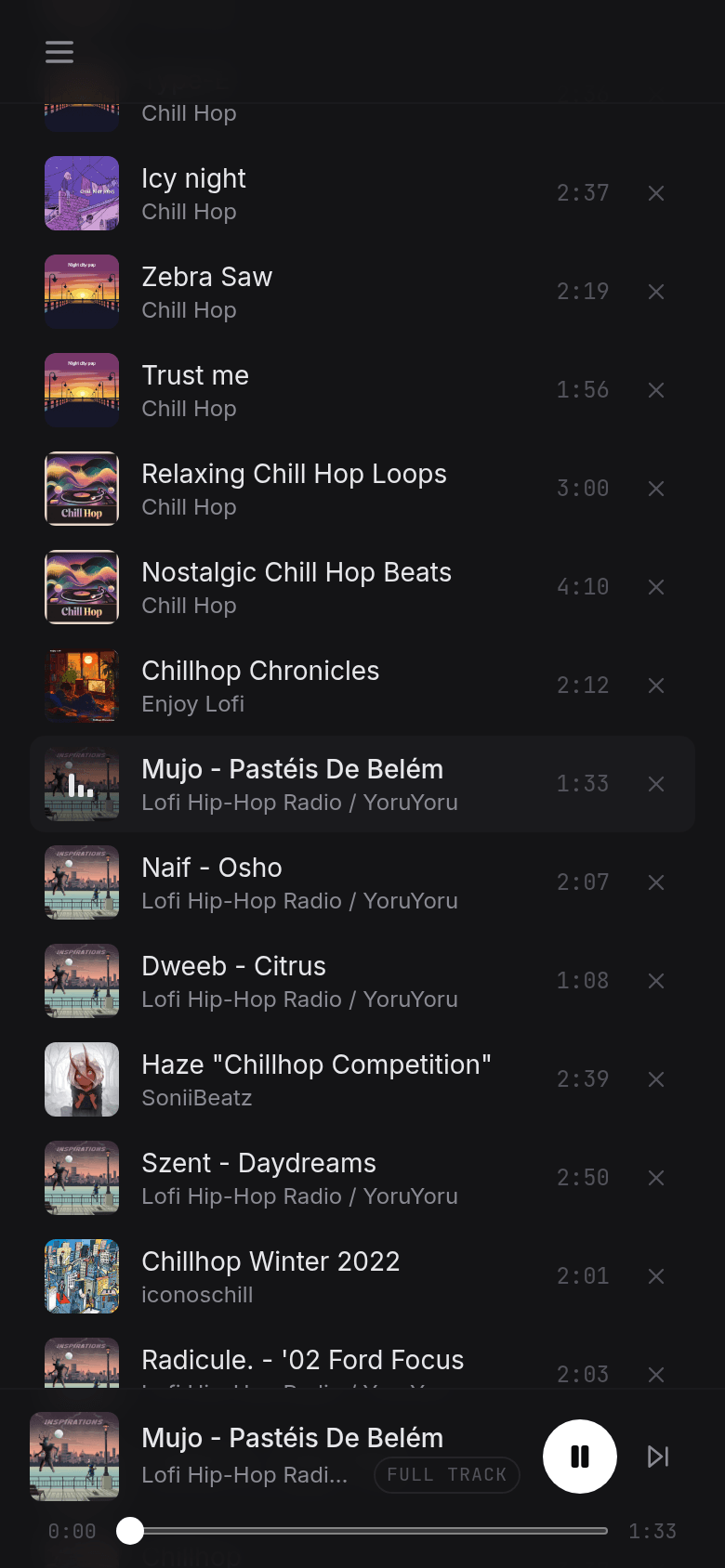
A queue plus a player bar with seek and volume, media-key and lock-screen controls, and sidebar links that open in a new tab while music plays.
Portail v2.15.0 shipped on 2026-11-16 as a minor release focused on portail tunes: say what you want to hear, and it plays. Portail has a music player now, and you don't have to know what to put on. Open Tunes in the sidebar and type what you're in the mood for, the way you'd say it to a friend who has good taste. "Something calm to focus to." "Upbeat songs for a run." "Rainy evening jazz." Portail works out what that means, finds the music, fills a queue and starts playing. There are no playlists to build and nothing to pick through. If you want a particular song, name it: "play Bohemian Rhapsody" puts on Bohemian Rhapsody. Name an artist and you get their best-known songs. Mix the two ("chill songs like Frank Ocean") and you get a few of theirs with some similar music after them. The music comes from two places, and the page always tells you which one you're hearing. Moods, genres and activities play full-length tracks by independent artists from Audius, a free streaming service where musicians share their work to be played. That covers a lot of what people put on while they work, study, cook or run: lo-fi, house, ambient, jazz, hip-hop, chill, focus music and plenty more. Songs and artists you name come from Deezer's mainstream catalogue, and those play as 30-second previews. Every preview carries a "Full song on Deezer" link, so when a preview hooks you, the whole song is one click away. We'd rather be clear about that than pretend: Portail can't play every famous song in full, so it tells you which tracks are previews instead of leaving you guessing. Portail also never makes a song up. The model only decides what to look for, and everything that plays comes straight from the catalogues. If a song you asked for isn't there, Tunes says it couldn't find it rather than slipping in a cover or something that sounds close. Follow-ups work the way you'd hope. "More like this" adds fresh tracks to the end of your queue and skips what you've already heard this session. "Something faster" or "less sad" builds on what's playing right now. If you just want to look something up by name, switch the box to Search: it checks both catalogues at once with no model involved, so it costs nothing. Asking Portail uses a very small amount of credits per request, and playing music uses none. The player does what a player should. There's a queue where you can play any track, remove one or clear the lot, and a bar along the bottom with play, pause, next, previous, a seek bar and volume. Your volume is remembered on that device. Media keys, headphone buttons and your phone's lock screen control it too, and the space bar plays and pauses when you're not typing. While music is playing, links in the sidebar open in a new tab, so checking a chat doesn't stop the song. You don't have to open Tunes at all, either. In the web app, ask any chat to "play some Daft Punk" or "put on something calm to study to", and the reply comes with a small player right under it: play, skip, the song list, and the same previews and full tracks as the Tunes page. The chat reply doesn't cost anything extra for the music, and the music keeps going when you switch to another chat, with a little player bar above the box you type in. "Open in Tunes" moves the whole queue to the Tunes page and carries on from the same second. Tunes works on every plan, in English and Russian, in light and dark, on a phone or a computer. It's in beta, so tell us what you asked for and what it played, especially when it gets it wrong. The work is recorded here because small releases are still product history. They change how people sign in, read responses, pay for access, share conversations, open files, or trust the system when something goes wrong.
This was more than a quiet maintenance pass. A minor release changes how a visible part of Portail behaves, how a larger workflow is framed, or how a user understands the product. The important part is not only that the feature exists. The important part is that it joins the rest of the system without making the chat harder to use. Portail is useful because context travels with the user. Every larger release has to protect that feeling.
The main changes were direct: new tunes page in the sidebar: type a mood, an activity, a genre, an artist or a song, and portail fills a queue and starts playing, in the web app, ask any chat to play something ("play some daft punk", "put on something calm to study to") and a player appears right under the reply. it keeps playing when you switch chats, and "open in tunes" carries the queue over, moods and genres play full-length tracks from independent artists on audius, songs and artists you name play as 30-second previews from deezer, each with a link to the full song, portail never invents a song. if something you asked for isn't in the catalogue, it tells you instead of playing a stand-in, "more like this" adds fresh tracks without repeating what you've heard, and follow-ups like "something faster" build on what's playing, search mode looks songs up by name with no model and no credits. asking portail uses a few credits; listening uses none, and a queue plus a player bar with seek and volume, media-key and lock-screen controls, and sidebar links that open in a new tab while music plays. That list is intentionally plain. It names what changed without turning the release into theatre. When a release fixes a build, a redirect, a storage path, or a UI edge case, the value is often that users stop noticing the problem. The archive keeps that invisible work visible enough for future debugging and for anyone checking whether Portail has cared about the details over time.
For this release, the archive points back to the verified commit trail instead of relying on memory. The title, date, and highlights come from the repository history around v2.15.0. That matters because a release log should be boringly checkable. If someone wants to know why a feature appeared, why a page changed, or why a billing rule behaves differently, the public record and the engineering record should not disagree.
This version also fits into the wider Portail contract. One account, one chat history, and one model picker only work if the smaller pieces keep their promises. Authentication has to fail clearly. Billing has to count honestly. Uploads have to arrive in a form models can read. Admin tools have to show the operator what happened instead of hiding it behind a blank screen. v2.15.0 moved that contract forward in its own narrow lane.
The product lesson is also worth naming. Portail grew quickly through chat, admin, billing, Canvas, Omniverse, Agents, and the coding hand-off bridge. Features landed close together, and some releases bundled polish with deeper infrastructure. This post separates the user-facing promise from the implementation noise. It says what the release changed, why that mattered, and where it sits in the product timeline.
The screenshots attached to this entry show the public release record as it now appears on portail.cc. For older releases, this archive was rebuilt from the git history, package version changes, release modal text, and commit subjects. That means the page is honest about its source: it documents the shipped change and preserves the record going forward, even when the exact old production screen cannot be recreated from a single saved image.
The practical result is simple. Someone landing on this page can see the version number, date, release tier, headline, highlights, and a real rendered screenshot of the archive page. Search engines can index the post through the canonical URL, sitemap entry, and structured data. Future releases now have a standard to meet before deploy, so the history should get cleaner from here instead of fuzzier.
Screenshots