Finance: log your money by hand
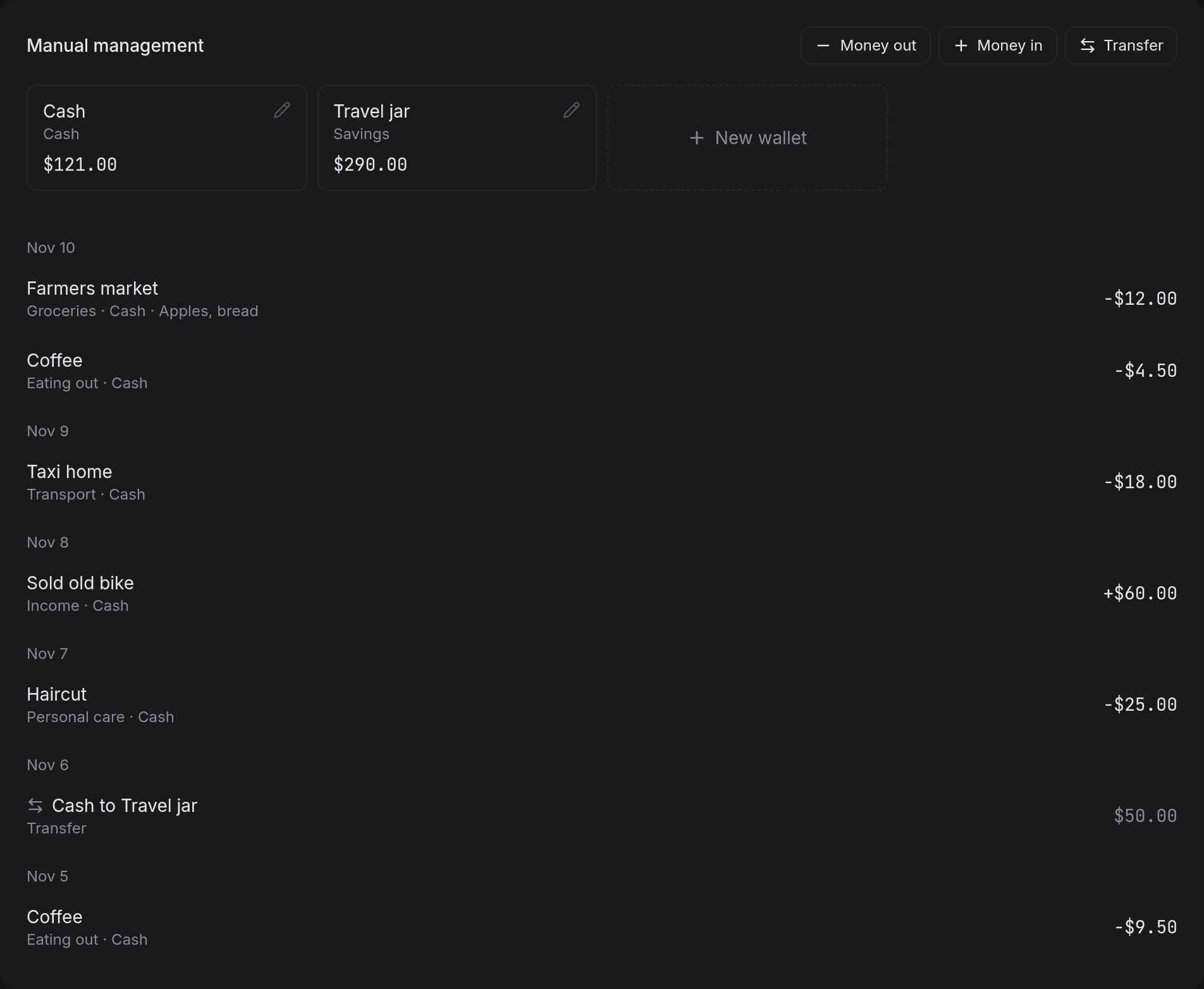
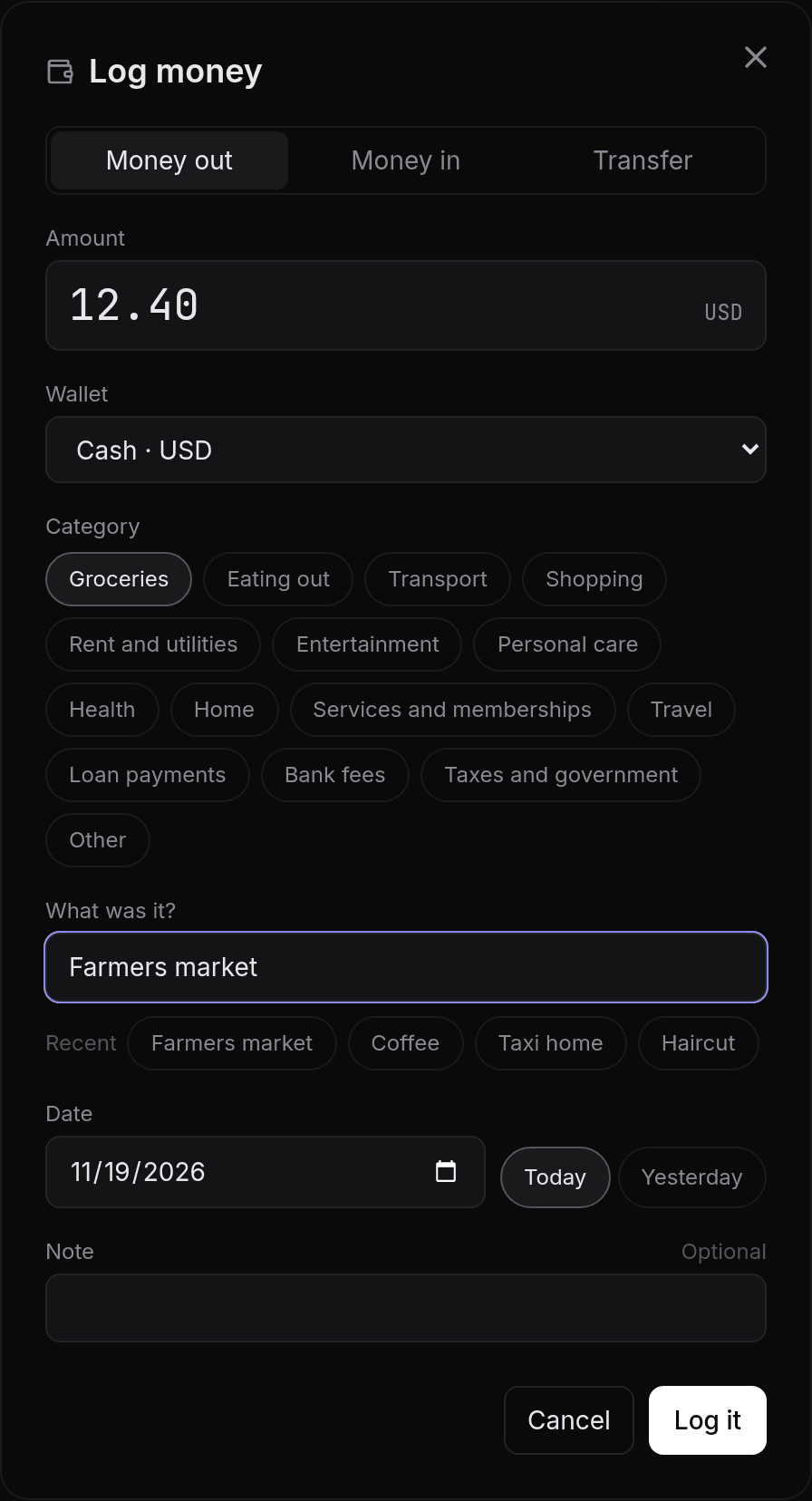
Finance could already read a linked bank or an imported statement, but a lot of money never shows up in either. Cash in your pocket, the envelope at home, a card from a bank that won't export a statement, the money you lent a friend. Manual management covers all of that. It's a new section on the Finance page where you keep wallets and log what happens to them yourself. Start by adding a wallet. A wallet is anywhere you keep money: Cash, Savings, a Card, or a Credit card. Give it a name, pick its currency and type in what's in it right now (for a credit card, what you owe). That's the starting point, and from there the balance looks after itself. To log something, press Money out, Money in or Transfer. The dialog opens with the amount field ready, so you can type the number straight away, in whatever way you usually write it: 45000, 45 000, 45,000, 1 250,50 and 1,250.50 all work, and the field shows how it read the number whenever there is a separator in it. Money out takes a category (groceries, eating out, transport and the rest of the categories Finance already uses), a short name like "Lunch" or "Taxi home", a date with Today and Yesterday one tap away, and an optional note. Places you logged recently appear under Recent, and tapping one fills in the name and its category. Money in is counted as income. A transfer moves money between two of your wallets, like putting cash into a savings jar or paying off a credit card, and it counts as neither spending nor income. If the two wallets use different currencies, you enter how much arrived on the other side. Everything you log shows up in a list grouped by day, newest first. Tap a wallet to see only its entries, and tap any entry to fix the amount, the category or the date, or to delete it. A transfer can't be edited, since it's two linked halves, but deleting it removes both. Editing a wallet lets you rename it or correct its balance; your entries stay as they are and the starting point moves instead. The important part is that these entries are not kept off to the side. They count everywhere else in Finance: spending by category, money in and out per month, budgets, subscriptions that repeat, and the Accounts widget. Chat can read your wallets too, so you can ask "how much cash did I spend on food this month?" and get an answer from your own numbers. Chat can't log or change anything; that happens on the Finance page. Manual management works on every plan and doesn't need a bank link at all, so it's also a way to start using Finance from nothing. On the first-run screen it sits next to linking a bank and importing a statement, as Log by hand. Finance is still read-only: Portail can't move, pay or invest your money, and nothing here touches a real account. You can keep up to 20 wallets and 5,000 entries. Deleting your last wallet removes everything you logged by hand, and if nothing else is connected, Finance resets the way it does when you remove your last bank or statement. It's in English and Russian, light and dark, on a phone or a computer.
1202 words
New Manual management section in Finance: keep wallets for cash, cards, savings and credit cards, and log money by hand.
Money out with a category, money in, and transfers between wallets, including between currencies.
Balances update themselves from what you log; edit a wallet's balance any time without touching your entries.
Recent places fill in the name and category in one tap, with Today and Yesterday one tap away.
Entries count in spending, budgets, cash flow, subscriptions and Accounts, and chat can read them.
Works on every plan with no bank link. Up to 20 wallets and 5,000 entries.
Portail v2.17.0 shipped on 2026-11-19 as a minor release focused on finance: log your money by hand. Finance could already read a linked bank or an imported statement, but a lot of money never shows up in either. Cash in your pocket, the envelope at home, a card from a bank that won't export a statement, the money you lent a friend. Manual management covers all of that. It's a new section on the Finance page where you keep wallets and log what happens to them yourself. Start by adding a wallet. A wallet is anywhere you keep money: Cash, Savings, a Card, or a Credit card. Give it a name, pick its currency and type in what's in it right now (for a credit card, what you owe). That's the starting point, and from there the balance looks after itself. To log something, press Money out, Money in or Transfer. The dialog opens with the amount field ready, so you can type the number straight away, in whatever way you usually write it: 45000, 45 000, 45,000, 1 250,50 and 1,250.50 all work, and the field shows how it read the number whenever there is a separator in it. Money out takes a category (groceries, eating out, transport and the rest of the categories Finance already uses), a short name like "Lunch" or "Taxi home", a date with Today and Yesterday one tap away, and an optional note. Places you logged recently appear under Recent, and tapping one fills in the name and its category. Money in is counted as income. A transfer moves money between two of your wallets, like putting cash into a savings jar or paying off a credit card, and it counts as neither spending nor income. If the two wallets use different currencies, you enter how much arrived on the other side. Everything you log shows up in a list grouped by day, newest first. Tap a wallet to see only its entries, and tap any entry to fix the amount, the category or the date, or to delete it. A transfer can't be edited, since it's two linked halves, but deleting it removes both. Editing a wallet lets you rename it or correct its balance; your entries stay as they are and the starting point moves instead. The important part is that these entries are not kept off to the side. They count everywhere else in Finance: spending by category, money in and out per month, budgets, subscriptions that repeat, and the Accounts widget. Chat can read your wallets too, so you can ask "how much cash did I spend on food this month?" and get an answer from your own numbers. Chat can't log or change anything; that happens on the Finance page. Manual management works on every plan and doesn't need a bank link at all, so it's also a way to start using Finance from nothing. On the first-run screen it sits next to linking a bank and importing a statement, as Log by hand. Finance is still read-only: Portail can't move, pay or invest your money, and nothing here touches a real account. You can keep up to 20 wallets and 5,000 entries. Deleting your last wallet removes everything you logged by hand, and if nothing else is connected, Finance resets the way it does when you remove your last bank or statement. It's in English and Russian, light and dark, on a phone or a computer. The work is recorded here because small releases are still product history. They change how people sign in, read responses, pay for access, share conversations, open files, or trust the system when something goes wrong.
This was more than a quiet maintenance pass. A minor release changes how a visible part of Portail behaves, how a larger workflow is framed, or how a user understands the product. The important part is not only that the feature exists. The important part is that it joins the rest of the system without making the chat harder to use. Portail is useful because context travels with the user. Every larger release has to protect that feeling.
The main changes were direct: new manual management section in finance: keep wallets for cash, cards, savings and credit cards, and log money by hand, money out with a category, money in, and transfers between wallets, including between currencies, balances update themselves from what you log; edit a wallet's balance any time without touching your entries, recent places fill in the name and category in one tap, with today and yesterday one tap away, entries count in spending, budgets, cash flow, subscriptions and accounts, and chat can read them, and works on every plan with no bank link. up to 20 wallets and 5,000 entries. That list is intentionally plain. It names what changed without turning the release into theatre. When a release fixes a build, a redirect, a storage path, or a UI edge case, the value is often that users stop noticing the problem. The archive keeps that invisible work visible enough for future debugging and for anyone checking whether Portail has cared about the details over time.
For this release, the archive points back to the verified commit trail instead of relying on memory. The title, date, and highlights come from the repository history around v2.17.0. That matters because a release log should be boringly checkable. If someone wants to know why a feature appeared, why a page changed, or why a billing rule behaves differently, the public record and the engineering record should not disagree.
This version also fits into the wider Portail contract. One account, one chat history, and one model picker only work if the smaller pieces keep their promises. Authentication has to fail clearly. Billing has to count honestly. Uploads have to arrive in a form models can read. Admin tools have to show the operator what happened instead of hiding it behind a blank screen. v2.17.0 moved that contract forward in its own narrow lane.
The product lesson is also worth naming. Portail grew quickly through chat, admin, billing, Canvas, Omniverse, Agents, and the coding hand-off bridge. Features landed close together, and some releases bundled polish with deeper infrastructure. This post separates the user-facing promise from the implementation noise. It says what the release changed, why that mattered, and where it sits in the product timeline.
The screenshots attached to this entry show the public release record as it now appears on portail.cc. For older releases, this archive was rebuilt from the git history, package version changes, release modal text, and commit subjects. That means the page is honest about its source: it documents the shipped change and preserves the record going forward, even when the exact old production screen cannot be recreated from a single saved image.
The practical result is simple. Someone landing on this page can see the version number, date, release tier, headline, highlights, and a real rendered screenshot of the archive page. Search engines can index the post through the canonical URL, sitemap entry, and structured data. Future releases now have a standard to meet before deploy, so the history should get cleaner from here instead of fuzzier.
Screenshots