Scheduled tasks: Portail works while you're away
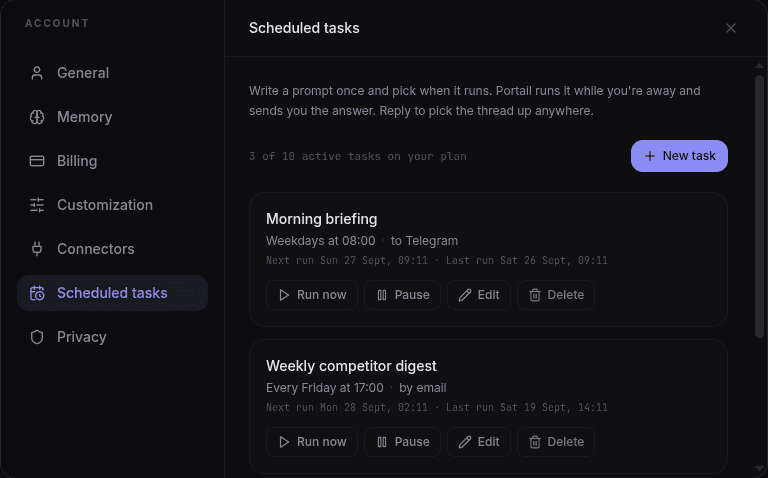
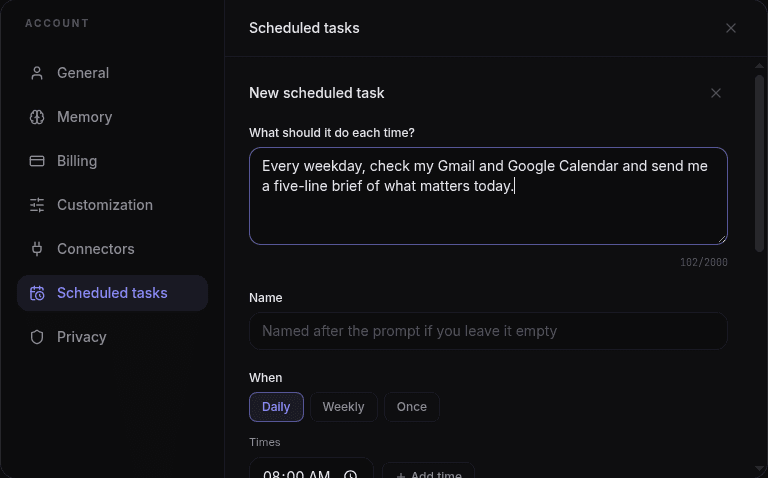
Write a prompt once, pick when it runs, and Portail runs it on its own. A weekday briefing from your Gmail and Calendar at 8:00, a Friday digest of competitor news, a one-off reminder next Tuesday. Each task keeps its own chat thread, and the answer is delivered to Telegram, your inbox, or just the web. Reply in Telegram and you pick up that same thread. Tasks that would change something in a connected app, like sending an email or adding a calendar event, stay read-only until you turn writes on for that task, and every action a run takes is listed at the top of its result.
749 words
Scheduled tasks: run any prompt daily at chosen times and weekdays, weekly, or once at a set date.
Delivery to Telegram, email, or the web only. Each task has its own thread, and replying in Telegram continues it.
Schedule this: a clock button on any message you sent turns it into a task in one tap.
Connector writes (send email, add events, and so on) are off by default and opt-in per task, with every action logged under Actions taken.
Run now, pause, resume, and edit from Account > Scheduled tasks, or type /tasks in the Telegram bot.
Portail v2.3.0 shipped on 2026-09-26 as a minor release focused on scheduled tasks: portail works while you're away. Write a prompt once, pick when it runs, and Portail runs it on its own. A weekday briefing from your Gmail and Calendar at 8:00, a Friday digest of competitor news, a one-off reminder next Tuesday. Each task keeps its own chat thread, and the answer is delivered to Telegram, your inbox, or just the web. Reply in Telegram and you pick up that same thread. Tasks that would change something in a connected app, like sending an email or adding a calendar event, stay read-only until you turn writes on for that task, and every action a run takes is listed at the top of its result. The work is recorded here because small releases are still product history. They change how people sign in, read responses, pay for access, share conversations, open files, or trust the system when something goes wrong.
This was more than a quiet maintenance pass. A minor release changes how a visible part of Portail behaves, how a larger workflow is framed, or how a user understands the product. The important part is not only that the feature exists. The important part is that it joins the rest of the system without making the chat harder to use. Portail is useful because context travels with the user. Every larger release has to protect that feeling.
The main changes were direct: scheduled tasks: run any prompt daily at chosen times and weekdays, weekly, or once at a set date, delivery to telegram, email, or the web only. each task has its own thread, and replying in telegram continues it, schedule this: a clock button on any message you sent turns it into a task in one tap, connector writes (send email, add events, and so on) are off by default and opt-in per task, with every action logged under actions taken, and run now, pause, resume, and edit from account > scheduled tasks, or type /tasks in the telegram bot. That list is intentionally plain. It names what changed without turning the release into theatre. When a release fixes a build, a redirect, a storage path, or a UI edge case, the value is often that users stop noticing the problem. The archive keeps that invisible work visible enough for future debugging and for anyone checking whether Portail has cared about the details over time.
For this release, the archive points back to the verified commit trail instead of relying on memory. The title, date, and highlights come from the repository history around v2.3.0. That matters because a release log should be boringly checkable. If someone wants to know why a feature appeared, why a page changed, or why a billing rule behaves differently, the public record and the engineering record should not disagree.
This version also fits into the wider Portail contract. One account, one chat history, and one model picker only work if the smaller pieces keep their promises. Authentication has to fail clearly. Billing has to count honestly. Uploads have to arrive in a form models can read. Admin tools have to show the operator what happened instead of hiding it behind a blank screen. v2.3.0 moved that contract forward in its own narrow lane.
The product lesson is also worth naming. Portail grew quickly through chat, admin, billing, Canvas, Omniverse, Agents, and the Portail Code bridge. Features landed close together, and some releases bundled polish with deeper infrastructure. This post separates the user-facing promise from the implementation noise. It says what the release changed, why that mattered, and where it sits in the product timeline.
The screenshots attached to this entry show the public release record as it now appears on portail.cc. For older releases, this archive was rebuilt from the git history, package version changes, release modal text, and commit subjects. That means the page is honest about its source: it documents the shipped change and preserves the record going forward, even when the exact old production screen cannot be recreated from a single saved image.
The practical result is simple. Someone landing on this page can see the version number, date, release tier, headline, highlights, and a real rendered screenshot of the archive page. Search engines can index the post through the canonical URL, sitemap entry, and structured data. Future releases now have a standard to meet before deploy, so the history should get cleaner from here instead of fuzzier.
Screenshots